How to play Word Connect
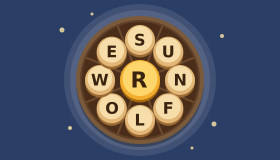
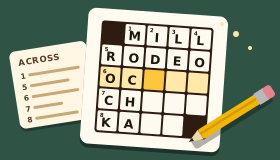
Word Connect gives you a circle of letters and a small crossword grid. Swipe across the letters to spell a word, and if it belongs in the grid it drops into place. Fill every word in the grid to finish the level. Real words that aren’t in the grid count as bonus words.
Step by step
Look at the letters
A circle of letters sits under the grid. Every word in the grid is made only from these letters.
Swipe to spell a word
Put your finger or mouse on the first letter and slide through the others in order. Let go to check the word. You can also tap the letters one by one and press Enter, or type them on a keyboard.
Fill the grid
If your word is one of the answers, its squares fill in. Letters shared with crossing words fill in too, which helps with the next word.
Find bonus words
A real word made from the letters that isn’t in the grid is a bonus word. It is added to your bonus list.
Shuffle or ask for a hint
Shuffle moves the letters round the circle to help you see new words. A hint shows one more letter in the grid.
Finish the level
When every word in the grid is filled, the level is complete. Press Next level for a new set of letters.
The full rules
What you need
Word Connect needs only a handful of letters and a small crossword grid. On GamesBento the letters sit in a circle and you swipe across them to spell. On paper, write the letters in a ring, draw the grid of empty squares above, and fill it in as you find the words.
The aim
Fill every word in the grid using only the letters in the circle. Each word in the grid crosses at least one other, so every word you find gives you letters for the next one.
How to play
- Swipe across the letters in order to spell a word, then let go to check it. A line follows your finger so you can see the word you are making.
- Slide back to the letter before to take the last letter back.
- Tap instead if you prefer: tap the letters one at a time, then press Enter. Tap the last letter again, or the back arrow, to take it back.
- Shuffle moves the letters round the circle.
You can also play with a keyboard. Type the letters, press Backspace to take one back, Enter to check, Space to shuffle and Escape to clear.
When a word is one of the answers, its squares light up in the grid. If it isn’t, a short message says why, perhaps the word is too short or isn’t on our word list, and you can simply try again.
Bonus words
The letters usually make more words than the grid has room for. Any other real word you find is a bonus word. Bonus words are kept in a list under the game, with a running total across every level.
Hints
If you are stuck, press Hint. One more letter appears in the grid, shown in blue with a dashed edge, in the word that is closest to done. Hints are unlimited, and a word whose letters have all been shown counts as found.
Levels
Level 1 starts with four letters and three or four words to find. The levels grow to five, then six, then seven letters, with up to eight words in the grid. Each level is the same for everyone, and your progress is saved on this device so you can carry on where you left off.
Tips for word swipe puzzles
- Start with the longest word. One word always uses every letter. Once it is in the grid, it gives you letters for every word that crosses it.
- Use the grid. Count the squares to see how long each missing word is, and look at the letters already filled in.
- Look for small words inside big ones. BREAD has BED, BAR and BEAR hiding inside it.
- Try plurals and endings. If there is an S, a D or an R, see whether a word you have found can take it.
- Shuffle often. A new order of the letters is the quickest way to see a new word.
Common questions
Which words are in the grid?
Only everyday words, such as BREAD, BEAR and DARE. Every grid also has one word that uses all of the letters in the circle.
What are bonus words?
Any other word on our word list made from the letters, such as BARD from the letters of BREAD. They don’t fill the grid, but they are kept in your bonus list and counted across every level.
How do hints work?
Each hint shows one letter in the grid, in the word that is closest to done. If a hint shows the last missing letter of a word, that word counts as found. Hints are unlimited.
Is every level the same for everyone?
Yes. Level 1 is always the same puzzle, and so is every level after it, so you can compare notes with friends.
Can I stop and come back later?
Yes. Your level and the words you have found are saved on this device as you go.
Can I play with a keyboard?
Yes. Type the letters, press Backspace to take one back, Enter to check, Space to shuffle and Escape to clear. Shift and H asks for a hint.
Where it comes from
Word connect puzzles, where you swipe across a circle of letters to fill a small crossword, became popular as phone games in the mid-2010s. They blend two much older pastimes: making anagrams and smaller words from a set of letters, and filling in the squares of a crossword.