Looking for free online games for seniors that are easy to see, easy to start and do not ask you to sign up for anything? Every game on GamesBento is free, opens straight away in your web browser and has big, clear pieces. You will find card games, dominoes, puzzles and word games here, with hints and undo when you want them and no countdown clocks in the puzzles. This guide explains what makes a game comfortable to play, takes you on a short tour, and finishes with some tips for setting up a tablet, including a section for family members who are helping someone get started.
You can also see all of our picks together on the games for seniors page.
What makes a game senior-friendly?
There is nothing special about a game for older adults. A good game is simply a good game. But some games are much more comfortable to play than others, especially if your eyesight is not what it was or you are new to tablets. These are the things worth looking for.
Big, clear pieces
Cards should be large enough to read without squinting, and dominoes, numbers and letters should stand out clearly from the background. A choice of light or dark colours helps too. Our games have a light and dark theme you can switch with one tap at the top of the page.
No timers
A ticking clock turns a relaxing puzzle into a test. None of our puzzles has a countdown, so you can stop to make a cup of tea halfway through a Sudoku and carry on when you come back. The arcade games, which are naturally a bit quicker, all have a slow speed setting and a pause button.
No account and no download
You should not need to remember yet another password just to play a game of patience. Nothing on GamesBento needs an account, and nothing needs installing. Your games save automatically in the browser on your own device.
Hints and undo
Everyone makes the odd slip, especially on a touch screen. Being able to undo a move takes the worry out of it. Hints are there for the moments when you are stuck and would rather keep going than give up.
Sound on or off, and full screen
Gentle sound effects can make a game feel more lively, but not everyone wants them. There is one simple switch to turn sound on or off for every game. A full screen button lets the game fill the whole display, which makes everything that little bit bigger.
It works on a tablet
Tablets are often the most comfortable way to play: they sit on a lap or a table, and you simply tap what you want. All of our games work by touch as well as with a mouse.
A tour of the games, by type
Here is a quick look at what is on offer. Each game has a short How to play guide if you would like a reminder of the rules.
Card games
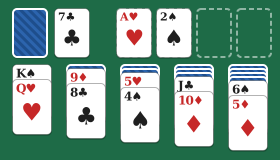
If you grew up playing cards, this is a lovely place to start. Klondike Solitaire is the patience game most people know, and FreeCell is a thoughtful version where nearly every deal can be won.
For a game with company, Gin Rummy, Hearts and Cribbage let you play against friendly computer players who take their turns at an easy pace. Cribbage does all the pegging and scoring for you, which many people appreciate. See the card games page for the full list.
Dominoes and board games
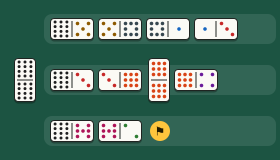
Mexican Train is a sociable dominoes game where everyone builds a line of tiles out from the centre. Classic Dominoes is the familiar draw and block game, and Checkers, or draughts, is the jump-and-capture board game many of us learned as children.
Word games
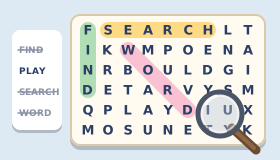
Word games suit anyone who enjoys a crossword or a good book. Word Search is calm and familiar, with themed lists and letters you tap to select. Hangman is the classic guessing game with a gentle twist: a flower loses a petal for each wrong guess instead of the usual drawing. Word Scramble and Word Guess offer something a little different each day.
Puzzles and memory games
Sudoku needs no arithmetic at all, just careful thought, and has easy, medium and hard levels. Nonograms reveal a hidden picture as you go. Our new Memory Match is the classic pairs game, where you turn over large cards two at a time to find the matches. Start on easy with just a few pairs.
The brain games page gathers the logic, word and memory games together.
Something calm
Some days you just want to unwind. Klondike Solitaire, Word Search and Tile Merge are all relaxed games with no pressure at all. The relaxing games page has more ideas.
Daily puzzles: a gentle routine
Many of the puzzles have a new puzzle every day, the same for everyone. Some people like to do the daily Sudoku with their morning coffee, or the daily Hangman after lunch. It gives a pleasant shape to the day, and you can chat about it with friends or family who play too.
Setting up a tablet for comfortable play
A few minutes of setting up can make playing much easier. You only need to do these things once.
Bookmark your favourite games
When you find a game you like, add a bookmark in your browser so you can return with one tap. On most tablets you tap the share or menu button, then choose “Add bookmark”.
Add a game to the home screen
Even better, you can put a game straight onto the home screen, so it sits alongside your other apps with its own picture.
- On an iPad or iPhone (Safari): open the game, tap the share button (a square with an arrow pointing up), then choose “Add to Home Screen”.
- On an Android tablet (Chrome): open the game, tap the three dots in the top corner, then choose “Add to Home screen” or “Install app”.
Now the game opens with a single tap, just like an app, without anything to download from an app store.
Make text bigger
If the words around the game feel small, your tablet’s settings can help. Look under Display or Accessibility for “Text size” or “Display size”. In the browser, you can usually pinch with two fingers to zoom in on a page. For the game itself, the full screen button and turning the tablet sideways give the most room.
Play without internet
Once you have opened a game, many of them keep working even if the internet drops out, which is handy on holiday or in a home with patchy Wi-Fi. Our page on games without internet explains how.
For family members helping someone get started
If you are setting up games for a parent or grandparent, a little preparation goes a long way. Here are some ideas that tend to work well.
- Choose two or three games, not thirty. Too much choice can be off-putting. Pick games they already know, such as patience, dominoes or a word search, and put those on the home screen.
- Play the first game together. Sit side by side and take turns. It is far easier to learn by doing than by reading instructions.
- Show them undo and hints. Knowing that mistakes can be put right makes people much more willing to have a go.
- Set the sound and colours to suit. Some people love the little sound effects; others find them distracting. Try the light and dark theme to see which is easier on the eyes.
- Reassure them about privacy. There is no account and no email address involved, and nothing to buy. They cannot accidentally run up a bill.
- Write a short note. A card by the tablet that says “Tap the Solitaire picture to play” can be a great help on the days you are not there.
If they enjoy it, you might play the same daily puzzle and compare notes on the phone. Our article on games to play with elderly parents has more ideas for playing together, both on screen and at the table.
Choosing a game for the mood
Not sure where to begin? Here is a quick guide.
- Something familiar: Klondike Solitaire, Dominoes or Word Search.
- A bit of company: Mexican Train, Gin Rummy or Cribbage.
- Something to think about: Sudoku, FreeCell or Memory Match.
- A few minutes with words: Hangman or Word Scramble.
- Something new: Oware, an ancient African game of sowing seeds around a board.
You can browse every game on the all games page, and find the rules for each on the guides page. Try a couple, keep the ones you like, and come back whenever you fancy a game. Your progress will be waiting where you left it.